C# programming tips and tricks
1. Take input in functional way(like what’s been done in F#)
If you want to play around with actual code, please visit this LeetCode playground
Also, You can download code snippet file for Visual Studio from here
No redundant introduction. Let’s take a look at the actual code first:
        static IEnumerable<string> Take(Func<string> function)
        {
            while (true)
            {
                yield return function();
            }
        }

        static IEnumerable<string> TakeInput([NotNull]Func<string> inputSource, [NotNull]Func<string, bool> stop)
        {
            return Take(inputSource).TakeWhile(stop);
        }
Well, upon first look, you might ask what the hell is going on here. Especially looking at that while(true) loop. Seem like this program will spin forever.
Well the trick involved here is actually how IEnumerable
What’s happening here is that the Take function acting as an enumerator. yield return will return value(the value returned by function which passed in as parameter.) one by one; and yes, it is in side the while loop which is indeed an infinite loop.
What stops this loop is the TakeWhile method. You can check documentation here. When take a value from Take method, it will evaluate the function called stop passed into TakeInput. When stop function evaluate to false, it will stop taking any value. As a result, the previous loop will be stopped.
The benefit of this way take a collection of input is that, as you can see, there is not one local variable. No value to change, therefore you may never need comeback wondering if there is anything go wrong in this part of code.
To use this code, one can simply do following (taking input from console window). As following code shows:
    var list = TakeInput(Console.ReadLine, x=>!x.Trim().Equals(""));
    foreach(var e in list)
    {
        Console.WriteLine($"You entered: {e}");
    }
As you can see in above code, the source of value is Console.ReadLine function which read input from console. The stopping condition is when line read in from console is empty. Of course you can change both function, to define your own source of input and stopping condition.
Caution
The code above is all good, but there is something need some attention. That is the behavior of IEnumerable acting like sequence which means if you do something as follow:
    foreach(var e in TakeInput(Console.ReadLine, x=>!x.Trim().Equals(""))
    {
        Console.WriteLine($"You entered: {e}");
    }
You would see output something like following:

This is due to the execution of IEnumerable, (an inaccurate) explanation is that IEnumerable is executed at the last moment it has to. So when foreach loop calls TakeInput function it read in input from console tested the line read in is not empty and returned the line, then it paused waiting for it to be called again, at this time foreach loop executed whatever inside loop which in this case print out whatever you entered. Then when loop comes back calls TakeInput function again, the whole process repeat itself.
To change it, do following:
    var list = TakeInput(Console.ReadLine, x=>!x.Trim().Equals("").ToList();
    foreach(var s in list){
        Console.WriteLine($"You entered: {s}");
    }
Then you would get output as you expected:
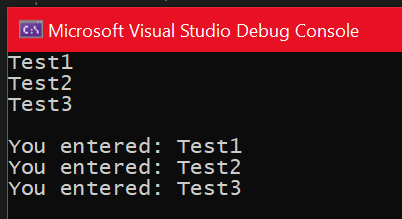
That’s it, that is how you take input in a functional way in C#.